

As part of digital transformation initiatives, most of the organizations are working on multiple technology initiatives to enhance their operations, including going paperless. These programs have typically been structured as multi-year initiatives to integrate technology into every area of the business for generating unprecedented value to customers.
Today, due to COVID-19 related shutdowns or slowdowns in business and closures of physical workplaces, business operations involving document processing have come under severe pressure to go paperless. There are anecdotal evidences that people are not comfortable in working with paper, due to the threat posed by the virus. As a result of this, digital transformation has suddenly become one of the top business priorities. COVID-led pandemic has given a great push toward digital transformation.
A comprehensive digital document processing strategy to go paperless can greatly help businesses to quickly enable their workforce for remote working. It does not need much change in daily work routines and does not require a lengthy or costly implementation.
Essential components of such a strategy will include –
- A digital document processing system: Technology to digitize, import, store, manage and enable collaborative processing of paper and electronic documents
- Cloud: Secure, ready to use and accessible from anywhere
Beyond remote working, this presents enormous opportunities to build a modern workplace with improved efficiency, productivity, and profitability. This article shares light on such a solution for the millions of businesses that are looking to quickly adopt digital processing to manage their businesses in the current situation and prepare themselves for any such situation in future.
Paperless is the New Normal

The year 2020 will be remembered as a defining moment in the history of our planet. The unfortunate pandemic has brought in major changes in our lives, disrupting both social and business interactions across the globe. While people are confined to their homes, businesses are facing immense challenges due to shutdowns caused by the prevailing situation.
The good news is that there are a number of technological solutions available in the marketplace, and Newgen is among the first to come out with a comprehensive architecture and solution to act upon business documents digitally.
In the scenario of today’s new normal, where customers, vendors, and employees are reluctant to venture out, OmniDocs ActiveScript (an automated document processing system) will assist you to modify existing document-centric processes, ensuring that they keep running with little or no disruption.
OmniDocs ActiveScript – Document Processing Made Easy

Documents are the backbone of business entities. Organizations receive (or generate internally) plethora of documents daily while conducting their businesses. Any document or set of documents originated in the organization has a purpose and needs some action.
For example –
- An account opening application received by a bank to open a person’s savings account
- An invoice received from a vendor that needs to be paid
- A letter received from a customer requesting change of contact details
- A resume is received for candidate’s consideration of a job, this might get accepted or rejected
The list of such documents goes on and a typical organization receives/generates these documents by the hundreds, every day. The documents may be submitted in physical form or digitally.
Related documents are put together in a folder, which then moves from person to person for actions and approvals. Typically, a series of actions are performed on these documents by different people and on different transaction systems, in a well-defined, orchestrated manner.
For example, in case of an account opening application, an account will be opened in the organization’s Banking System after all the documents submitted with an application are verified and approved, in line with the account opening process of the bank.
Similarly, for an invoice submitted by a vendor, the payment will be made through an organization’s payment system. When the last of these actions is performed, documents are sent for archival. These archived documents can be retrieved any time based on business needs, compliance reporting, audit purposes, etc.
OmniDocs ActiveScript provides a comprehensive framework for defining and executing document centric business processes, like the ones discussed above.
The entire lifecycle of the associated documents is covered in three simple stages – Initiate, Authorize, and Archive.
At the core of OmniDocs ActiveScript is Newgen’s OmniDocs – a modern, scalable content services platform. It includes a library of purpose-built templates known as “Active Scripts” for various organizational document-centric transactions for a jump-start experience.
The solution is available on cloud, secure, easy to use and can ensure business continuity in any situation by enabling people to work from the safety of their homes.
Key Features of OmniDocs ActiveScript
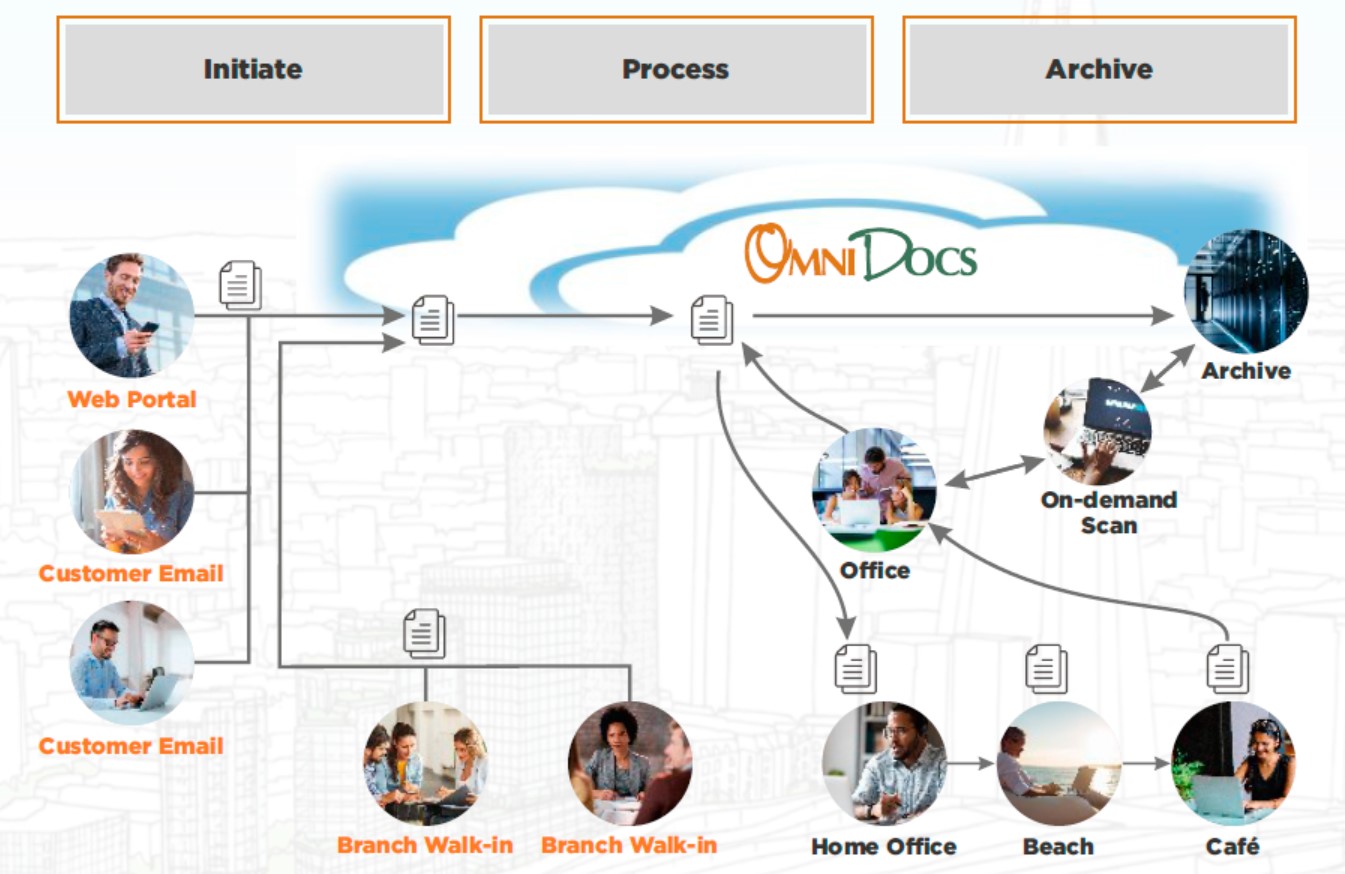
- Multi-channel intake: Supports multi-channel intake of different document types, including scanned images of physical and electronic document
- Pre-defined industry-specific templates: Offers 100+ pre-defined, ready-to-deploy ActiveScripts for industry-specific use cases, including invoice processing, loan application, employee onboarding, and more
- Document indexing: Indexes documents in a set format for accurate processing and easy search and retrieval, For instance, for the account opening process, documents can be associated with the following index fields:
- CIF number
- Customer name
- Branch
- Date of account opening
- Remote Processing: Supports multi-step processes where documents flow from one step to another, along with the attached metadata and actions. Furthermore, offers maker-checker capability so that documents are auto-routed, facilitating seamless processing
- Storage and information security: Archives documents in a centralized repository, facilitating easy information search and retrieval. Also, offers secure access to the repository so that only intended users view, add, or modify documents
- Hosting on Cloud: Offers flexibility and ensures business continuity with cloud deployment, allowing users to process documents anytime, anywhere
- Built-in Mobile Apps: OmniDocs ActiveScript comes along with a standard Mobile App for Android and iOS based devices. The App interface allows users to access and process documents on your mobile device.
Use Cases of OmniDocs ActiveScript

Let us now look at some of the most common use cases of document processing across industries. Many of these are also available as ready-to-use “active script” templates which can be used as they are or can be modified according to specific needs of your organization.
Idea is to get you started quickly and to help you make a robust strategy for automating all or most of your document centric processes.
Example 1: Account Opening Application for a Bank
Customers submit KYC documents such as photograph, identity proof and address proof along with completed application forms, via email or through a portal or in physical form.

Stage 1: Initiation
In the first step, the documents are uploaded into the system along with the Account Opening Application Form. Indexing information is entered as well. Physical documents are digitized by responsible bank officer(s) through Newgen OmniScan Desktop or Newgen OmniScan Web interface and then uploaded. Documents sent via email or portal are uploaded through an email agent (Outlook) or directly through Bank’s web-based portal.
Stage 2: Authorization
Here, the responsible officers review the documents for each request in one or more steps, through the OmniDocs ActiveScript interface and either approve or reject.
Stage 3: Entry into Banking System & Filing (or Archival)
Upon approval, customer account is opened by making entries into your Banking System. In case a request is rejected, it is sent back, where the documents can be uploaded again or the customer is intimated of rejection. Finally, the documents are filed in the central repository with indexes for search and retrieval by users, as per business needs.
Example 2: Invoice Processing in a Manufacturing Organization
Let us see another example, where organizations in manufacturing sector must make faster payments to their vendors. Generally, vendors deliver raw materials (along with invoices) at various manufacturing units, who then send the invoices to a central office for payment.

Stage 1: Initiation
Here, invoice documents are uploaded into the System, along with indexing information such as Invoice Number, Date, Vendor Name etc. Documents submitted physically will be scanned before uploading, whereas documents received through email or portal, will be added through appropriate software agents.
Stage 2: Authorization
Here, the Verifier looks at the documents in the OmniDocs ActiveScript Interface and performs relevant checks. If OK and an invoice is approved, it will be sent to the next step. If rejected, the documents will be sent back for re-upload or may be discarded without payment processing.
Stage 3: Entry into Business Application and Filing (or Archival)
The payment processing team/person will make necessary entries into the organization’s Payment Processing System to initiate payments. Also, the documents will now be archived into OmniDocs ActiveScript and will be available for references as and when needed.
Are you ready for a Paperless Digital Future?

Organizations are finding it difficult to realize their vision of digital processing. However, they can gain immediate benefits by improving their approach to digital document processing – especially digital document ingestion. This approach acknowledges that paper documents will remain a reality for some years to come but enables organizations to move along the path to a fully digital future.
To be effective, digital document processes must consider the full range of inputs (both paper and digital) where documents are submitted physically or sent via e-mail or by providing them through a web portal and cover the end-to-end workflow. To make this possible, an organization typically needs to build or acquire the required technologies that encompass all of the above and much more. This is especially true for situations arising out of need, where people will prefer to work from the safety of their homes. A comprehensive Digital Document Processing System will help you to take care of your organization’s immediate needs and at the same time establish a robust foundation for future.
An organization that cannot get digital document processing right will put their other digitization efforts – and their ambitious digital goals – at risk. As the businesses transform and move to digital technologies, OmniDocs ActiveScript System will not only help you mitigate such a risk, but also aid you to manage and grow your business.
Looking to implement a Paperless Office?
For a detailed understanding on how OmniDocs ActiveScript can embark you on your digital framework, get in touch today for scheduling a free consultation and demo.
Author