

2020 has been a year like no other, with the onset of coronavirus forcing businesses to close their office doors and switch to remote working. Thanks to the right IT, some businesses were able to make this transition headache-free; for many, it wasn’t so easy as they had to scramble to quickly adapt their IT to make remote working work.
In today’s world, it’s vital for businesses to enable remote work for their teams but, for many, simply buying additional hardware outside of a desktop PC isn’t possible.
That’s where a Windows Virtual Desktop (WVD) can help.
It may sound complicated, setting up a Windows Virtual Desktop in Azure can enable your employees to continue working, as if on their office desktop, on any device. Removing the need for additional business hardware, a Windows Virtual Desktop empowers you to provide a secure, productive experience in a changing world.
Since its release last year, Windows Virtual Desktop (WVD) has been gaining traction across multiple organizations, mainly those looking to provide a better user experience for their employees, have the latest security and feature updates, and reduce costs across their IT environment. Especially since March, WVD has become a solution that organizations started looking at for their company’s needs as most of the global workforce had to suddenly work from home.
In this article, we will examine what is WVD all about and how your organization can benefit from it.
What is Windows Virtual Desktop (WVD)?
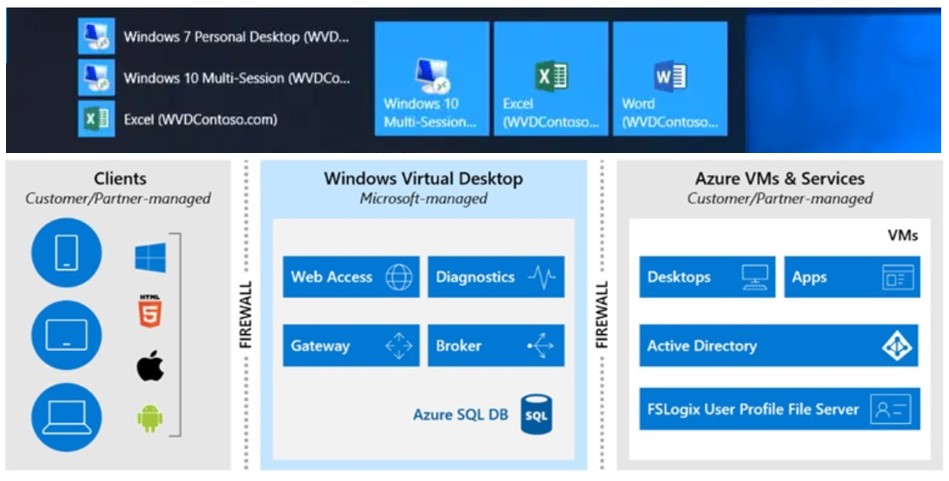
Windows Virtual Desktop (WVD) is a fully Cloud-based, desktop and app virtualisation service provided by Microsoft and powered by Azure. With built-in security and compliance features, Windows Virtual Desktop provides a secure virtual desktop infrastructure to an organisation’s end-users, allowing them to work form a Cloud-based platform they can access from any device.
Here’s what you can do when you run Windows Virtual Desktop on Azure:
- Set up a multi-session Windows 10 deployment that delivers a full Windows 10 with scalability
- Virtualize Microsoft 365 Apps for enterprise and optimize it to run in multi-user virtual scenarios
- Provide Windows 7 virtual desktops with free Extended Security Updates
- Bring your existing Remote Desktop Services (RDS) and Windows Server desktops and apps to any computer
- Virtualize both desktops and apps
- Manage Windows 10, Windows Server, and Windows 7 desktops and apps with a unified management experience
Along with the features listed above, running WVD on Azure also comes with Microsoft’s security protocols and elements to help create a secure network that is always being updated with the latest in security enhancements.
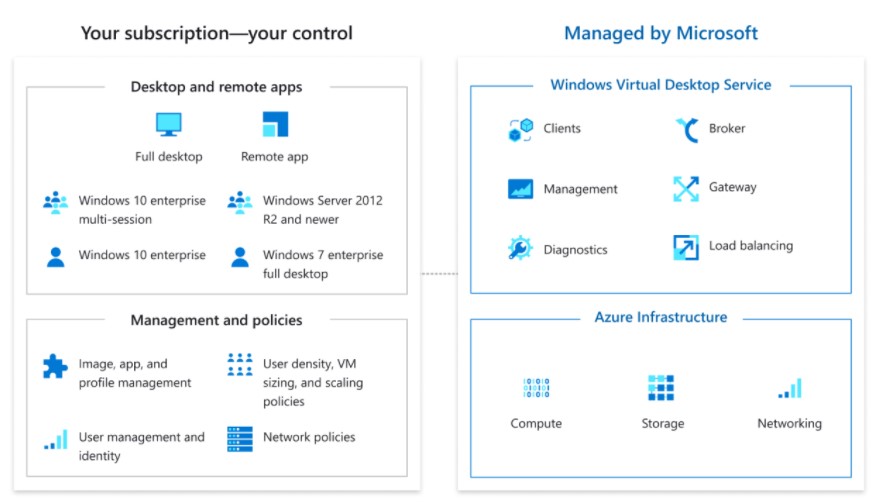
As a Desktop-as-a-Service (DaaS) offering, Azure WVD is highly cost-effective compared to scaling up a traditional virtual desktop environment in your own data center. With the business disruption during COVID-19, companies were trying to find ways to extend their remote work infrastructure while keeping their operating expenses low. Companies already on a Microsoft ecosystem, such as Windows 10 Enterprise or Microsoft 365, had additional incentives to make the shift.
Another driver for Mirosoft WVD during this time is that it lets organizations control apps and data while allowing their employees to access those resources from their own devices. This is something that a traditional VDI/RDS environment can also provide; however, the cost advantage of Azure WVD, when combined with security and control, creates a winning combination.
If IT decision-makers consider the end-user benefit, another reason to choose Microsoft WVD is the superior experience of Windows 10 and Office 365 that it can provide. The right user experience increases productivity. You don’t want to frustrate your valuable employees with a clunky experience while they work from home.

Hosting your desktops on Azure also means you get Azure’s state-of-the-art security features. Microsoft claims that Azure is considered as the most secure public cloud platform, and Azure WVD provides the best DaaS security model for customers.
With Azure WVD, users can only access the virtual machines by going through the Azure Active Directory authentication system. This means companies can use multifactor authentication and conditional access according to their needs and depending on the employee profile. Also, Azure uses reverse connect technology that lets you run a virtual machine (VM) without keeping any inbound ports open. This means that the VMs on Azure WVD are not exposed to the Internet directly.
How Does Windows Virtual Desktop (WVD) Benefit Your Organization?

The use of virtual desktops has exploded in recent years, and is expected to grow almost 30 percent by 2020. That’s significant, considering that in 2017, 42 percent of businesses were already using at least a virtually hosted apps. Full-service virtualization is the next natural step.
In today’s environment, it’s vital for businesses to enable remote work strategies for their teams. Windows Virtual Desktop enables users to continue work through desktop and application virtualisation, empowering companies to provide a secure, productive experience in a changing world.
Let’s explore some of the benefits of WVD for your organization:
Workplace Flexibility
It might be the most obvious advantage. If your desktops are hosted virtually, employees and members of your team will be able to access them regardless of their location, situation, or device. The result, generally speaking, is significantly increased flexibility within the workplace.
Imagine a remote workforce that can suddenly leverage the same technology without expensive installs. Meanwhile, the Bring-Your-Own Device (BYOD) trend is taking off, with 87 percent of organizations now relying on their employees to use personal devices for at least one application.
In each case, flexibility is essential, by hosting your desktops and applications in the cloud, you can achieve accessibility even in these situations.
Windows Virtual Desktop provides full Windows 10 and Windows Server desktop and application virtualization on any personal device, from any internet-connected location. Seamless integration with Microsoft 365 Apps for enterprise and Microsoft Teams helps end users be productive with the desktop experience they expect.
Significant Cost Savings
Virtual Desktops typically come with relatively minimal cost if the server setup already exists. In exchange, you can get potentially significant savings down the road. In other words, desktop virtualization is much more than just an initial cost. It’s a positive investment that has the potential to bring a significant return.
First, you can rely less on expensive desktop computers with the exact right software and license needed. But even upgrades and maintenance, which can take significant IT time when performed on many different machines, are reduced to a minimum as they can be accomplished in a much more centralized manner.
Maximize use of your virtual machines through the exclusive Windows 10 multi-session capability, which enables multiple concurrent users. This OS support allows for multiple users to log into a single Windows 10 VM.
The multi-session capability promotes significant cost savings compared to other VDI solutions. In standard VDI solutions, single users are assigned a dedicated virtual machine. Whereas when using Windows 10 multi-session with WVD, multiple users are assigned to a pool of desktops, thus sharing resources (and costs).
Dynamic Updating
As your organization gets larger, computer choices become more diverse. Managers expect laptops that increase portability, but tablets and even phones become invaluable while on the go. The concern for IT administrators here is that all of these devices might be running different operating systems and app versions.
Updating these various devices with both regular maintenance and major upgrades can quickly become difficult. The same software may not work equally well depending on the browser, OS, and age of the machine. A virtual desktop becomes a solution, centralizing the updating process to make it more dynamic.
Windows Virtual Desktop manages the virtual desktop infrastructure for you, so you can focus on users, apps, and OS images instead of hardware inventory and maintenance. Quickly and securely get your users up and running with limitless scale and full automation that you control based on your business needs.
Decreased Security Risks
Especially as organizations grow, digital security becomes an increasingly essential concern. After all, a single cyber-attack can have a profound impact on the business. Preventative measures are not optional, but absolutely essential to ensure long-term business survival and success.
A virtual environment for your business will play a significant part in making your business more secure. The data is now stored in a central system, which you can protect more strongly than you would be able on your employees’ devices. Everything is centrally managed, allowing you to set the rules and keep your data in the right hands.
Most data breaches happen by accident. You can prevent both these accidents and intentional attacks simply by keeping better track of your data, and how it is accessed.
With WVD, easily apply the right access controls to users and devices with Azure Active Directory Conditional Access. Reduce vulnerabilities and help keep your virtual desktops secure by leveraging reverse connections and security solutions like Azure Firewall, Azure Sentinel, and Azure Security Center.
Better Disaster Recovery
Like cybersecurity, disaster recovery has become an essential part of IT management. Almost 50 percent of businesses who experience a disaster without a recovery plan in place never recover from it. How can you make sure that your organization doesn’t become another part of that depressing statistic?
Virtualization certainly isn’t the only step, but it becomes a crucial help. You no longer rely on the stationary computers that might be lost or damaged in the disaster. Instead, the data is stored in a centralized location, safe and backed up regularly. Even as recovery efforts begin, you can already access that data to minimize downtime and potential damages.
Windows Virtual Desktop specifically offers the same security that Microsoft Azure provides. Microsoft invests more than $1 billion annually on cyber security research and development with more than 3,500 security experts on staff completely dedicated to users’ data security and privacy. Azure also has more compliance certifications than any other cloud provider to ensure that your virtual desktop has the highest security possible.
Geo-Replication
Azure has long been a leader in geo-replication, the process of creating a parallel database in various regions of the globe. This replication alone provides further help against data loss. The above already describes disaster recovery, and the role a VDI can play in that. Geo-replication extends that security for cases when the central data storage unit might be endangered.
Given that Azure recently extended this feature to all of its service tier, it’s natural to expect that it will be available within its virtualization suite as well. As a result, you can leverage a natural form of backups that carries the added benefit geographic separation to multiply the security factor.
Increased Productivity
Finally, and on an overarching level, moving to a virtual desktop interface will almost certainly improve your organization’s productivity. IT operations become more lean and agile, while employee abilities and efforts become more flexible.
Productivity can be maintained even in the face of disaster, and in a more secure environment thanks to better protection against data breaches. Finally, the long-term cost savings can be invested into the business for better operations down the road.
Are You Ready to Switch to a Windows Virtual Desktop (WVD) Solution?

As working from home and BYOD become the new norm, Windows Virtual Desktop (WVD) will serve a familiar and efficient UX, while maintaining high levels of security and cost savings for the company.
In the process, you might need a partner. Switching to virtual environment is a major change, both for your employees and your digital infrastructure. As Azure experts, we are here to help.
Contact us to start the conversation of what you can gain from moving to a VDI, and how you can prepare for the move.
Author