

Enterprise resource planning (ERP) refers to a type of software that organizations use to manage day-to-day business activities such as accounting, procurement, project management, risk management and compliance, and supply chain operations.
A complete ERP suite also includes enterprise performance management, software that helps plan, budget, predict, and report on an organization’s financial results.
ERP systems tie together a multitude of business processes and enable the flow of data between them. By collecting an organization’s shared transactional data from multiple sources, ERP systems eliminate data duplication and provide data integrity with a single source of truth.

Today, ERP systems are critical for managing thousands of businesses of all sizes and in all industries. To these companies, ERP is as indispensable as the electricity that keeps the lights on.
When selecting a new enterprise resource planning (ERP) system, one of the most critical factors in your decision will be whether you choose to deploy it on-premise or in the cloud.
Cloud-based ERP systems are more common than ever before. Today, nearly every ERP vendor offers some form of cloud deployment option, and some have ditched their on-premise offerings altogether.
But there are still several reasons why a small or midsize business might choose a traditional on-premise system, which, until recently, was the norm in the ERP space. Which one is right for your organization? Well, only you can make that decision, but this rundown on the pros and cons of each should make it easier.
On-Premise Meaning
With on-premise software, from implementation to running of the solution, everything is done internally; whereby maintenance, safety and updates also need to be taken care of in-house.
Once the software is purchased, it is then installed on your servers; requiring additional power servers, database software and operating systems to be purchased. With no third-party involvement, you assume complete ownership.
Cloud Computing Meaning
Cloud computing is the delivery of on demand computer system resources, requiring no active management and usually includes applications such as storage and processing power. With a Cloud-based subscription model, there is no need to purchase any additional infrastructure or licenses.
In exchange for an annual fee, a cloud provider maintains servers, network and software for you. The information hosted by the vendor can be accessed through a web portal. The dedicated private cloud allows customers to use the platform completely, with no shared resources.
They can request additional customization, backup controls and upgrades. With a shared cloud, complete privacy of the client’s data is observed, however multiple tenants share the cloud service. It is a more economical option but offers limited customization.
What is Cloud ERP?
Enterprise Resource Planning (ERP) software can handle different functions such as from accounting to systems that analyze control inventory or the supply chain. Cloud ERP offers cloud computing platforms and services, whereby facilitating flexible business process transformations.
Cloud ERP enables companies to access the software via the Internet. Since computing resources are licensed and not purchased, the cost is lower. Companies also benefit from business-critical applications that the cloud ERP vendor has on offer. Regardless of the size your business, cloud ERP solutions powered with intelligent technologies can take your business to new heights.
What is On-Premise ERP?
On-Premise ERP software on the other hand is deployed and maintained in-house at a physical office as opposed to being hosted on a vendor-supplied cloud. It runs under company supervision, while the ERP systems and data remain under the company’s control. On-Premise ERP allows specialized integration with other existing business systems.
On-Premise vs Cloud ERP
There are two key differences between Cloud and On-Premise software; the cost for each differs and so does the level of ownership.
For smaller firms, the cloud is particularly more useful as it provides full functionality at a reasonable price as there is no upfront investment required. Plus cloud software is usually priced under a monthly or annual subscription package, covering training, support and updates.
The right cloud provider would offer enhanced scalability and agility. Therefore with cloud computing you get greater flexibility, time and money savings.
On-Premise on the other hand is mostly priced under an upfront perpetual license fee. In addition to that, the company remains responsible and bears the cost for training, support and updates. However, On-Premise applications are presumed to be more reliable, secure; offering complete ownership and control.
There are companies that still opt for on premise solutions as opposed to the cloud. Both approaches bring something unique to the table but only after proper consideration can you determine which type of solution would be a perfect fit for your organization.
Below are some of the key things that you need to consider when choosing between an on-premise and cloud solution:
1. Deployment
With on-premise software, the company remains responsible for maintaining the solution and related processes. The deployment is done in-house using the company’s infrastructure.
In a hosted cloud, the service provider maintenance the systems on their server, accessible by the enterprise at any given time with related processes taken care of by the host-cloud service provider.
2. Control
In an on-premise environment, enterprises enjoy complete control over their systems and maintain 100 percent privacy. These are two reasons why most big organizations choose to stay away from the cloud.
In a cloud computing environment, even though the data and encryption keys are shared with the third-party provider, there is shared ownership and accessibility remains an issue if there is to be any downtime.
3. Security
Security is an essential requirement of any organization when it comes to financial account, customer and employee details. Even though traditional on-premise seems more secure as it is in-house, there are multiple measures that needs to be taken to fully maintain the security of the data.
With Cloud ERP systems there are very less chances of any hardware, software of infrastructure malfunction that can hinder the entire operation and result in hefty losses. The ERP vendor is more likely to have multiple disaster and redundancy protocols for data security. For both platforms, reliable network connectivity plays a very important role when it comes to remote areas.
4. Compliance
There are regulatory controls that most companies need to abide by. To meet these government and industry regulations, it is imperative that companies remain complaint and have their data in place. This can easily be achieved if all the data is maintained in-house.
When opting for a cloud computing model, companies need to ensure that the service provider is meeting the regulatory mandates within their specific industry. It is important that the data of customers, employees and partners is secure, thereby ensuring privacy.
5. Cost and Time
On-premises ERP solutions need higher investment up front to purchase and manage the software. If your organization does not have an IT team, you have to hire the right people to manage the system before you deploy it. You can consider On-premises ERP as capital expenditure. Setting up the infrastructure and deploying an On-premises ERP system is a time-intensive and cost-intensive process.
Cloud-based ERP systems are already set up and deployed on the cloud. You normally pay a subscription fee which includes hardware and software costs. Assuming everything else remains the same, this cost is generally lower than the costs associated with an on-premises option in the long run. Using a cloud-based ERP can be considered operating expenditure, where you pay for as long as the services are utilized. Compared to on-premises systems, cloud-based ERP solutions takes less time to deploy.
6. Customization and Mobile Access
Customization and mobile accessibility are considering aspects of an ERP system. In the case of On-premises ERP system, it offers a great level of customization. But the process of customizing the On-premises ERP can delay the implementation process. As the ERP vendor rolls out new software updates and enhancements frequently, your existing system may go passive. The On-premises ERP is not readily available for real-time data monitoring by your employees and stakeholders.
In the case of cloud-based ERP system, the Implementation Partner will do the customization according to the company’s requirements. Your Cloud ERP system will be updated automatically with the latest updates and security patches. The end user can avail the Cloud ERP system through native mobile apps.
7. Integration and Scalability
Integration is one of the daunting factors to consider while choosing an ERP solution. In the case of on-premises, you need to pay much attention and time to integrate the new version with the existing legacy system. Sometimes, it may go void if the integration process is not done well. Whereas, in cloud ERP systems, the service provider will look after the integration process that delivers a seamless working experience for the client and end-user as well.
Scalability is all about your ERP’s flexibility with the eventual growth of business operations and the number of users. Cloud ERP solutions enable a great level of flexibility despite the increase in the number of operations and users. Perhaps, on-site ERP solutions don’t offer the same extent of freedom for the number of users. Often, you need to deploy additional hardware to handle it.
8. Training and Support
The On-premise ERP system needs extensive training and technical support to the employees for a long time.
In the case of cloud-based ERP systems, the service provider will support the technical team to manage the IT functions and support in fixing the technical aspects.

Past: 1990’s to the New Millennium – From On-Premises to Cloud ERP
From the 1990s until the beginning of the twenty-first century, ERP adoption grew rapidly. At the same time, the costs of implementing an ERP system began to climb. The hardware required to run the software was typically on company premises, with big machines in a server room.
Both the hardware and the software licenses required capital investments and depreciated over 5 to 10 years. In addition, organizations nearly always wanted to customize their ERP systems to fit their specific needs, entailing an additional expense of software consultants and training.
Meanwhile, ERP technology was evolving to embrace the internet, with new features and functionality such as embedded analytics. As time went on, many organizations discovered that their on-premises ERP systems couldn’t keep up with modern security demands or emerging technologies such as smartphones.
Today: A New ERP Delivery Model – Software as a Service (SaaS)
Enter the cloud – specifically, the software-as-a-service (SaaS) delivery model for ERP. When ERP software is delivered as a service in the cloud, it runs on a network of remote servers instead of inside a company’s server room.
The cloud provider patches, manages, and updates the software several times a year – rather than an expensive upgrade every 5 to 10 years with an on-premises system. The cloud can reduce both operational expenses (OpEx) and capital expenses (CapEx) because it eliminates the need for companies to purchase software and hardware, or hire additional IT staff.
These resources can instead be invested in new business opportunities, and the organization is always up-to-date on the most recent ERP software. Employees can shift their focus from managing IT to more value-added tasks such as innovation and growth.
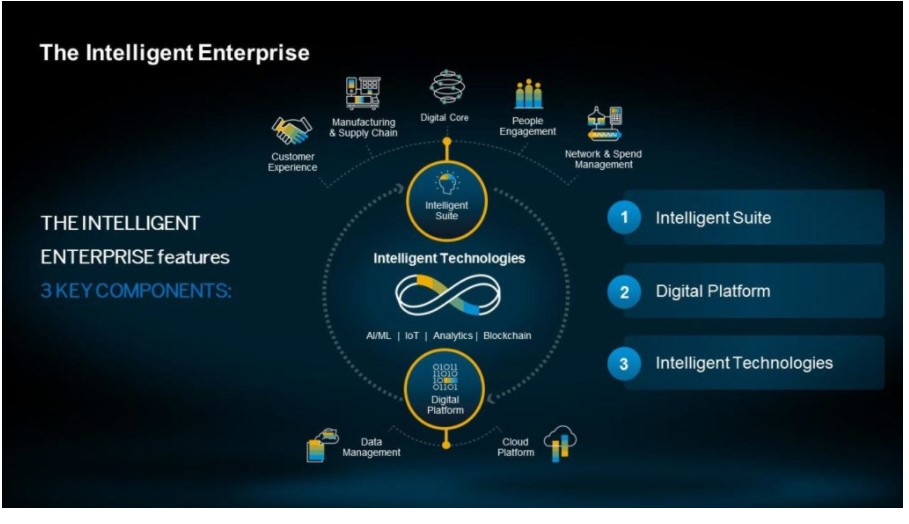
This also means that the latest new and revolutionary emerging technologies – such as AI, digital assistants, machine learning, blockchain, augmented reality, and the Internet of Things (IoT) – become available to subscribers on a regular cadence. With access to these new technologies, organizations can quickly improve their business best practices as the ERP software evolves.
They can automate processes that used to require heavy manual intervention, such as reconciling financial accounts. In addition, users gain a comprehensive, real-time understanding of enterprise business activities not only in the front office, but also in warehouses, on factory floors, and everywhere else across the enterprise. This knowledge is then readily available to every appropriate employee on their mobile devices, including smartphones and tablets.
Built for the digital age, today’s ERP cloud embraces mobile, social, analytics, and the latest emerging technologies.
On-Premise or Cloud ERP Model? Which is suitable for your Business?
When it comes to choosing a new ERP system, there are more ERP options than ever for businesses of all sizes. Cloud-based deployment models have made this software more accessible for SMBs -though these systems come with a few drawbacks, such as more limited customization and potential security concerns.
Conversely, on-premise ERP systems offer advantages in customization and control, but are more expensive upfront, and many don’t support mobile. This can be problematic for smaller buyers but, as is usually the case, it depends on the specific needs of the individual business.
Still not sure which deployment model is right for your organization? Get in touch with us for a free consultation and we can help you determine your needs, and an ideal solution suited for your business.
Author